# Kolibrio Orderflow Service

**Kolibrio Orderflow Service** is an RPC API that enables wallets, trading bots, solvers, and others to efficiently monetize incoming transactions and optimize on-chain execution. Live on Ethereum & Solana

<figure><img src="https://1868000901-files.gitbook.io/~/files/v0/b/gitbook-x-prod.appspot.com/o/spaces%2FhRgYcPxk1uWhwoszoApd%2Fuploads%2FusE1H9jMPTGtNS2Qjmrw%2F2024-11-11%2002.04.25.jpg?alt=media&amp;token=e2a2d5ae-ccac-491b-9fa5-0cd3759cddb7" alt=""><figcaption></figcaption></figure>

* [x] **MEV Protection**\
  Submit your transactions privately through trusted infrastructure providers to protect them from toxic MEV bots <br>
* [x] **Orderflow Monetization**\
  Generate revenue by capturing value through healthy arbitrage strategies on incoming transactions, along with an additional gas cost rebate for high-fee transactions.<br>
* [x] **Optimized Inclusion**\
  Accelerate transaction speed and ensure prioritized on-chain execution for faster, more reliable inclusion.


# Solana


# How it works

<figure><img src="https://1868000901-files.gitbook.io/~/files/v0/b/gitbook-x-prod.appspot.com/o/spaces%2FhRgYcPxk1uWhwoszoApd%2Fuploads%2FKZiwqaIO0TLeg3o1ZuAo%2Ftg_image_738726963.png?alt=media&amp;token=09037281-c12e-437e-8710-ce77a374a185" alt=""><figcaption></figcaption></figure>

### SOL Transaction Pipeline Flow <a href="#sol-transaction-pipeline-flow" id="sol-transaction-pipeline-flow"></a>

{% stepper %}
{% step %}
**SOL Originator sends a target transaction to Kolibrio OFA**

The originator submits the target transaction using the standard `sendTransaction` RPC method. Two key parameters are specified:

* `rev_recv`: The address where the revenue will be sent (paid in SOL).
* `tx_broadcast_mode`: Defines how the target transaction will be broadcast. Options include `backrun_only`, `jito`, and `public`. The default is `backrun_only`, meaning Kolibrio OFA will only submit the target transaction if arbitrage is discovered.
  {% endstep %}

{% step %}
**Target Transaction Simulation and Signal Sharing**

Kolibrio OFA simulates the target transaction, removes the signature, and shares the target transaction signal with arbitrage searchers, allowing them to run calculations but not submit the target transaction.
{% endstep %}

{% step %}
**Auction Execution and Target Transaction Broadcast**

Kolibrio OFA collects bids from arbitrage searchers based on their calculations in a 30-100ms time window. After the auction is finished, Kolibrio OFA broadcasts the winning bid as a bundle to Jito. Immediately after, it broadcasts the original target transaction based on the specified `tx_broadcast_mode`, but **only if required** by the broadcast mode (e.g., `jito` or`public`).
{% endstep %}

{% step %}
**Settlement and Revenue Distribution**

Once the target transaction is included in a block, it is followed by an arbitrage backrun, which automatically sends the SOL revenue to the `rev_recv`.
{% endstep %}
{% endstepper %}

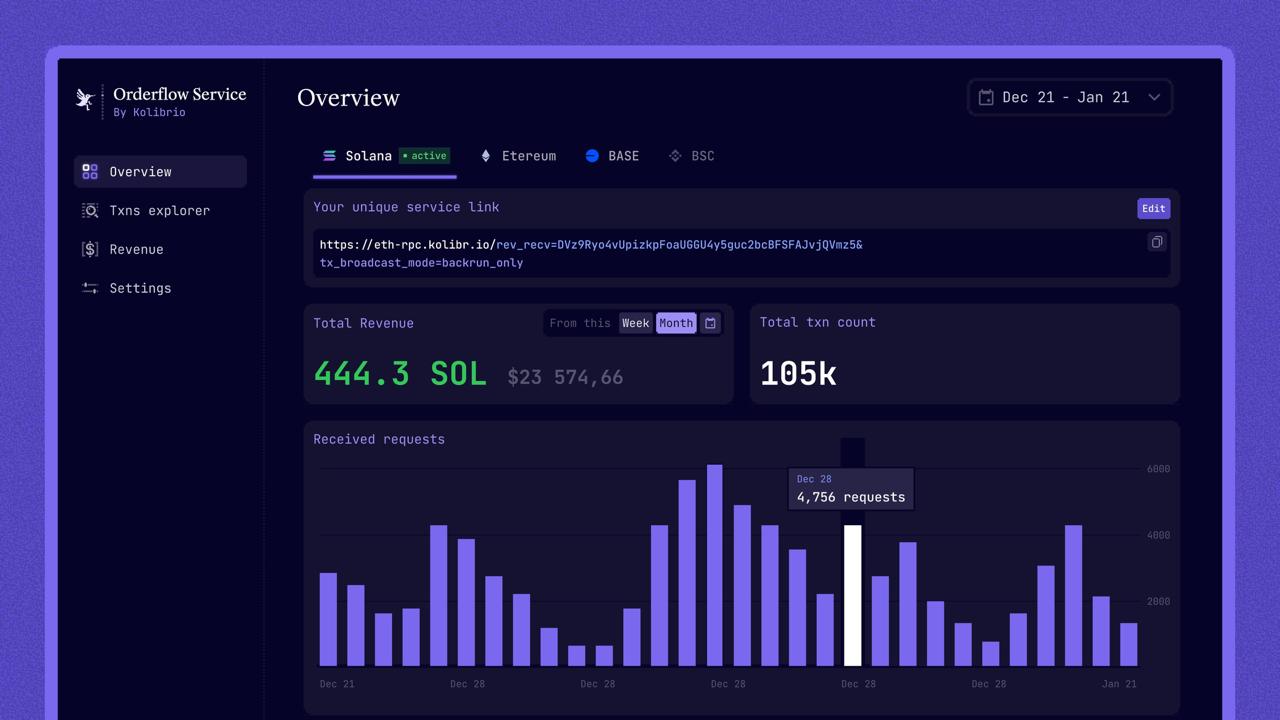
**Check out** [**app.kolibrio.xyz**](https://app.kolibrio.xyz)**, create your dedicated profile, view your stats, and claim your revenue.**

<figure><img src="https://1868000901-files.gitbook.io/~/files/v0/b/gitbook-x-prod.appspot.com/o/spaces%2FhRgYcPxk1uWhwoszoApd%2Fuploads%2FqBykSGu3pGfZ1iCnElxd%2Ftelegram-cloud-photo-size-2-5204351188873638956-y.jpg?alt=media&amp;token=6fa51f60-69d0-4106-870e-adc707d4a3fd" alt=""><figcaption></figcaption></figure>


# API: Quick Start


# SendTransaction

### Send Transaction RPC Method <a href="#send-transaction-rpc-method" id="send-transaction-rpc-method"></a>

<mark style="color:green;">`POST`</mark> <https://sol-rpc.kolibr.io/>\
Submits a signed transaction to the Kolibrio Order Flow service and rebroadcasts it to another source if required. Fully implements the standard Solana [`sendTransaction`](https://solana.com/docs/rpc/http/sendtransaction) RPC method.<br>

**Additional URL Query Parameters**

<table><thead><tr><th width="236">Name</th><th>Description</th></tr></thead><tbody><tr><td><strong><code>rev_recv</code> (required)</strong></td><td>The address that will receive arbitrage payments in SOL.</td></tr><tr><td><code>tx_broadcast_mode</code> (optional)</td><td><p>The method used to broadcast the target transaction. Available options:</p><ul><li><strong><code>backrun_only</code></strong> : Ignores the single target transaction submission. It will only be submitted as part of an arbitrage bundle. This mode is ideal for originators that want to mirror the transaction to extract arbitrage but handle the actual submission themselves.</li><li><strong><code>jito</code></strong>: Sends the target transaction to Jito. (<strong>note:</strong> the target transaction must include a Jito tip to be included individually)</li><li><strong><code>public</code></strong>(default): Sends the target transaction to known public RPCs.</li><li><strong><code>subsidy</code></strong>: Sends transactions to Jito as a bundle with an additional subsidy transaction, which increases the priority fee for better inclusion. <em>Note: an auth header is required to use this mode.</em> <a href="/kolibrio-orderflow-service/solana/advanced/subsidy-transactions">Learn more</a></li><li><strong><code>tips_rebate</code></strong>: Enables dual-path transaction broadcasting with partial tip recovery. <em>Note: an auth header is required to use this mode.</em> <a href="/kolibrio-orderflow-service/solana/advanced/subsidy-transactions">Learn more</a></li></ul></td></tr><tr><td><code>frontrun_protection</code> (optional)</td><td><strong><code>boolean</code></strong>(false by default)<br>Enables adaptive leader filtering. Transactions are routed away from slot leaders flagged for malicious ordering and preferentially sent to low-risk leaders. If the current or next leader is assessed as high risk, submission may be delayed or skipped. This feature operates on a best-effort basis without guarantees, while meaningfully reducing the likelihood of toxic frontrunning.</td></tr><tr><td><code>delay_ms</code> <br>(optional)</td><td><code>integer</code>(50 by default)<br>Maximum time (in milliseconds) Kolibrio may wait to find and land an arbitrage trade before submitting the original transaction to the current leader.</td></tr></tbody></table>

**Headers**

<table><thead><tr><th width="237">Name</th><th>Description</th></tr></thead><tbody><tr><td><code>Authorization</code> (optional)</td><td><p>An optional parameter, represented by a GUID string. While not required for basic operations, it is necessary for accessing premium features like the <code>subsidy</code> mode and enables higher rate limits.</p><p>To obtain an <code>Authorization</code> GUID, users must sign up in app.kolibrio.xyz</p></td></tr></tbody></table>

**Request Example**

{% tabs %}
{% tab title="curl" %}

```json
curl https://sol-rpc.kolibr.io/?rev_recv=DVz9Ryo4vUpizkpFoaUGGU4y5guc2bcBFSFAJvjQVmz5&tx_broadcast_mode=backrun_only \
  -X POST \
  -H "Content-Type: application/json" \
  -H "Authorization: 123e4567-e89b-12d3-a456-426614174000" \
  -d '
  {
    "jsonrpc": "2.0",
    "id": 1,
    "method": "sendTransaction",
    "params": [
      "4hXTCkRzt9WyecNzV1XPgCDfGAZzQKNxLXgynz5QDuWWPSAZBZSHptvWRL3BjCvzUXRdKvHL2b7yGrRQcWyaqsaBCncVG7BFggS8w9snUts67BSh3EqKpXLUm5UMHfD7ZBe9GhARjbNQMLJ1QD3Spr6oMTBU6EhdB4RD8CP2xUxr2u3d6fos36PD98XS6oX8TQjLpsMwncs5DAMiD4nNnR8NBfyghGCWvCVifVwvA8B8TJxE1aiyiv2L429BCWfyzAme5sZW8rDb14NeCQHhZbtNqfXhcp2tAnaAT"
    ]
  }
'
```

{% endtab %}
{% endtabs %}

**Response Example**

{% tabs %}
{% tab title="200" %}

```json
{
  "jsonrpc": "2.0",
  "result": "2id3YC2jK9G5Wo2phDx4gJVAew8DcY5NAojnVuao8rkxwPYPe8cSwE5GzhEgJA2y8fVjDEo6iR6ykBvDxrTQrtpb",
  "id": 1
}
```

{% endtab %}
{% endtabs %}


# sendTransactionMessage

### sendTransactionMessage RPC Method <a href="#send-transaction-rpc-method" id="send-transaction-rpc-method"></a>

<mark style="color:green;">`POST`</mark> <https://sol-rpc.kolibr.io/>\
Submit a Solana transaction **message** (unsigned) to the block engine. Unlike `sendTransaction`, this method accepts a `solana.Transaction.Message` rather than a full signed transaction, and does **not** broadcast the transaction on-chain.<br>

**Additional URL Query Parameters**

<table><thead><tr><th width="236">Name</th><th>Description</th></tr></thead><tbody><tr><td><strong><code>rev_recv</code> (required)</strong></td><td>The address that will receive arbitrage payments in SOL.</td></tr></tbody></table>

**Body Parameters**

<table><thead><tr><th width="236">Name</th><th>Description</th></tr></thead><tbody><tr><td>params[0] <strong>(required)</strong></td><td>encoded message. A string containing the Solana transaction message serialized and encoded in base64 or base58.</td></tr><tr><td>params[1].encoding <strong>(optional)</strong></td><td>If omitted, the server tries base64 first, then base58.</td></tr><tr><td>params[1].expectedSubmitDelay <strong>(optional)</strong></td><td>Expected delay in milliseconds before the transaction is submitted on-chain by the block engine.</td></tr></tbody></table>

**Headers**

<table><thead><tr><th width="237">Name</th><th>Description</th></tr></thead><tbody><tr><td><code>Authorization</code> (optional)</td><td><p>An optional parameter, represented by a GUID string. While not required for basic operations, it is necessary for accessing premium features like the <code>subsidy</code> mode and enables higher rate limits.</p><p>To obtain an <code>Authorization</code> GUID, users must sign up in app.kolibrio.xyz</p></td></tr></tbody></table>

**Request Example**

{% tabs %}
{% tab title="curl" %}

```json
curl https://sol-rpc.kolibr.io/?rev_recv=DVz9Ryo4vUpizkpFoaUGGU4y5guc2bcBFSFAJvjQVmz5 \
  -X POST \
  -H "Content-Type: application/json" \
  -H "Authorization: 123e4567-e89b-12d3-a456-426614174000" \
  -d '
  {
  "jsonrpc": "2.0",
  "id": 1,
  "method": "sendTransactionMessage",
  "params": [
    "<encoded message>",
    {
      "encoding": "base58",
      "expectedSubmitDelay": 200
    }
  ]
}
'
```

{% endtab %}
{% endtabs %}

**Response Example**

{% tabs %}
{% tab title="200" %}

```json
### Success
{
  "jsonrpc": "2.0",
  "id": 1,
  "result": "ok"
}

### Error
{
  "jsonrpc": "2.0",
  "id": 1,
  "error": {
    "code": -32002,
    "message": "<error description>"
  }
}
```

{% endtab %}
{% endtabs %}


# SendBundle

### Send Bundle RPC Method <a href="#send-transaction-rpc-method" id="send-transaction-rpc-method"></a>

<mark style="color:green;">`POST`</mark> <https://sol-rpc.kolibr.io/>\
Submits a signed transaction to the Kolibrio Order Flow service and rebroadcasts it to another source if required. Fully implements the standard Solana [`sendTransaction`](https://solana.com/docs/rpc/http/sendtransaction) RPC method.<br>

**Additional URL Query Parameters**

<table><thead><tr><th width="236">Name</th><th>Description</th></tr></thead><tbody><tr><td><strong><code>rev_recv</code> (required)</strong></td><td>The address that will receive arbitrage payments in SOL.</td></tr><tr><td><code>tx_broadcast_mode</code> (optional)</td><td><p>The method used to broadcast the target transaction. Available options:</p><ul><li><strong><code>backrun_only</code></strong> (default): Ignores the single target transaction submission. It will only be submitted as part of an arbitrage bundle. This mode is ideal for originators that want to mirror the transaction to extract arbitrage but handle the actual submission themselves.</li><li><strong><code>jito</code></strong>: Sends the target transaction to Jito. (<strong>note:</strong> the target transaction must include a Jito tip to be included individually)</li><li><strong><code>public</code></strong>: Sends the target transaction to known public RPCs.</li><li><strong><code>subsidy</code></strong>: Sends transactions to Jito as a bundle with an additional subsidy transaction, which increases the priority fee for better inclusion. <em>Note: an auth header is required to use this mode.</em> <a href="/kolibrio-orderflow-service/solana/advanced/subsidy-transactions">Learn more</a></li></ul></td></tr></tbody></table>

**Headers**

<table><thead><tr><th width="237">Name</th><th>Description</th></tr></thead><tbody><tr><td><code>Authorization</code> (optional)</td><td><p>An optional parameter, represented by a GUID string. While not required for basic operations, it is necessary for accessing premium features like the <code>subsidy</code> mode and enables higher rate limits.</p><p>To obtain an <code>Authorization</code> GUID, users must sign up in app.kolibrio.xyz</p></td></tr></tbody></table>

**Request Example**

{% tabs %}
{% tab title="curl" %}

```json
curl https://solana-rpc.kolibr.io/?rev_recv=DVz9Ryo4vUpizkpFoaUGGU4y5guc2bcBFSFAJvjQVmz5&tx_broadcast_mode=backrun_only \
  -X POST \
  -H "Content-Type: application/json" \
  -H "Authorization: 123e4567-e89b-12d3-a456-426614174000" \
  -d '
  {
    "jsonrpc": "2.0",
    "id": 1,
    "method": "sendTransaction",
    "params": [
      "4hXTCkRzt9WyecNzV1XPgCDfGAZzQKNxLXgynz5QDuWWPSAZBZSHptvWRL3BjCvzUXRdKvHL2b7yGrRQcWyaqsaBCncVG7BFggS8w9snUts67BSh3EqKpXLUm5UMHfD7ZBe9GhARjbNQMLJ1QD3Spr6oMTBU6EhdB4RD8CP2xUxr2u3d6fos36PD98XS6oX8TQjLpsMwncs5DAMiD4nNnR8NBfyghGCWvCVifVwvA8B8TJxE1aiyiv2L429BCWfyzAme5sZW8rDb14NeCQHhZbtNqfXhcp2tAnaAT"
    ]
  }
'
```

{% endtab %}
{% endtabs %}

**Response Example**

{% tabs %}
{% tab title="200" %}

```json
{
  "jsonrpc": "2.0",
  "result": "2id3YC2jK9G5Wo2phDx4gJVAew8DcY5NAojnVuao8rkxwPYPe8cSwE5GzhEgJA2y8fVjDEo6iR6ykBvDxrTQrtpb",
  "id": 1
}
```

{% endtab %}
{% endtabs %}


# FAQ

<details>

<summary>Who can use Kolibrio SOL Orderflow Service?</summary>

Any entity with SOL transaction orderflow can use Kolibrio's service. This includes wallets, trading terminals, telegram bots, rpc providers, and validators.

</details>

<details>

<summary>I'm a SOL validator. Can I use Kolibrio SOL Orderflow Service?</summary>

Yes, if you're a validator, you'll need to have the Jito-SOL client. The only required change in your validator config is updating the relayer URL. In this setup, you will receive revenue from both Jito and Kolibrio.\
\
Reach out to the Kolibrio team to receive integration instructions and support.

</details>

<details>

<summary>How much revenue should I expect from my transactions?</summary>

Revenue depends on various factors, such as market conditions, the volume of swaps in your stream, and how exclusive your transactions are. Based on our experience, typical originators can extract around 0.02-0.1% in SOL from exclusive trading volume.

</details>

<details>

<summary>How can I trust that the orderflow service searchers won’t frontrun my users' trades?</summary>

* Kolibrio only accepts ethical arbitrage bundles and enforces policies that prevent frontrunning. Searchers receive only the transaction message signal, not the full signed transaction, so they cannot submit frontrun bundles.<br>
* Kolibrio has gated access to its signal stream, allowing only searchers who have completed KYC to access your transaction

</details>

<details>

<summary>What arbitrage strategies does Kolibrio SOL Orderflow Service support?</summary>

Kolibrio connects with multiple searchers using a variety of arbitrage strategies that cover most market opportunities. This includes on-chain DEX-DEX arbitrage and CeFi-DeFi non-atomic trades.

</details>

<details>

<summary>How fast is the service?</summary>

Kolibrio SOL Orderflow Service is battle-tested, processing over 6 million transaction requests daily. The auction engine and searchers are colocated near the Jito block engine, with an average arbitrage discovery and submission time of 30-70ms.

</details>


# Advanced


# Jito GPRC Adapter

If you use Jito gRPC, just switch the URL to Kolibrio. Kolibrio proxies your auth flow, tx and bundles to Jito and adds arbitrage backrun profits on top.

1. Kolibrio fully supports the Jito gRPC interface. For gRPC integration, follow the official [Jito Docs](https://docs.jito.wtf/lowlatencytxnsend/#api)
2. You can find the proto files in the official [Jito repository](https://github.com/jito-labs/mev-protos/tree/b74a23ff236c0c223b1bc56daf7c5065bb585428)
3. The only difference - you need to use the Kolibrio URL instead of the Jito block engine URL

```
https://sol-grpc.kolibrio.xyz
```

4. You must use your Jito key to send transactions to Kolibrio URL (assume it's Jito). \
   Kolibrio applies the same Jito rate limits automatically
5. Share your Jito public key to Kolibrio so you'll have  revshare address for arbitrage backruns revenue assigned


# How to Protect Against Frontrunning on SOL

## Introduction

***

Front-running occurs when malicious actors exploit pending transactions to manipulate prices and gain an unfair advantage.\
\
On Solana, the mempool operates differently compared to Ethereum. The mempool stream is shared from RPC nodes to validators only when they are about to become the leader (a 1.2 to 3.6-second window). This design limits access to pending transactions, making it harder for attackers to exploit them directly.

However, some validators exploit this system by operating proxy relays within their environment. These relays leak pending transaction data to malicious searchers, who then execute sandwich attacks. In such attacks, searchers place a buy order ahead of the target trade and a sell order immediately after. This manipulation inflates the price for the user's trade, causing the user to receive worse terms and undermining the integrity of the transaction.<br>

## How To Protect&#x20;

***

### **Option 1:  Use Jito**

Using Jito is the most common way to make your transaction private. However, for the Jito Block Engine to accept your transaction, you need to include an extra priority tip in the form of a transfer instruction.<br>

**Priority Tip**:&#x20;

1. The tip must be a minimum of 1,000 Lamports. However, for better prioritization, we recommend tipping at least 10,000–20,000 Lamports.
2. The tip should be a transfer instruction directed to one of the following addresses:

```
[
    "ADuUkR4vqLUMWXxW9gh6D6L8pMSawimctcNZ5pGwDcEt",
    "3AVi9Tg9Uo68tJfuvoKvqKNWKkC5wPdSSdeBnizKZ6jT",
    "96gYZGLnJYVFmbjzopPSU6QiEV5fGqZNyN9nmNhvrZU5",
    "HFqU5x63VTqvQss8hp11i4wVV8bD44PvwucfZ2bU7gRe",
    "Cw8CFyM9FkoMi7K7Crf6HNQqf4uEMzpKw6QNghXLvLkY",
    "ADaUMid9yfUytqMBgopwjb2DTLSokTSzL1zt6iGPaS49",
    "DfXygSm4jCyNCybVYYK6DwvWqjKee8pbDmJGcLWNDXjh",
    "DttWaMuVvTiduZRnguLF7jNxTgiMBZ1hyAumKUiL2KRL"
]
```

**Code Example:**&#x20;

<pre class="language-javascript"><code class="lang-javascript"><strong>const { Connection, PublicKey, Transaction, SystemProgram, Keypair } = require("@solana/web3.js");
</strong>
// Set up connection and payer
const connection = new Connection("https://sol-rpc.kolibr.io/?tx_broadcast_mode=jito");
const payer = Keypair.generate(); // Replace with your wallet Keypair
const tipAddress = new PublicKey("ADuUkR4vqLUMWXxW9gh6D6L8pMSawimctcNZ5pGwDcEt");

// Create and send transaction with TIP instruction
(async () => {
  const transaction = new Transaction().add(
    SystemProgram.transfer({
      fromPubkey: payer.publicKey,
      toPubkey: tipAddress,
      lamports: 10000, // Priority tip in lamports
    })
  );

  const signature = await connection.sendTransaction(transaction, [payer]);
  console.log(`Transaction submitted: ${signature}`);
})();

</code></pre>

\
**Url To Submit:** [https://sol-rpc.kolibr.io/?tx\_broadcast\_mode=jito](<https://solana-rpc.kolibr.io/?tx_broadcast_mode=jito&#xA;>)\ <br>

### **Option 2: Use Kolibrio Subsidy Transactions**

***

If adding a priority tip directly to the target transaction is not possible, Kolibrio supports subsidy transactions. In this case, the originator sends a standard transaction to Kolibrio's RPC endpoint. \
\
**Url To Submit:** [**https://sol-rpc.kolibr.io/?tx\_broadcast\_mode=subsidy**](https://solana-rpc.kolibr.io/?tx_broadcast_mode=subsidy)\
\
Kolibrio automatically generates an additional transaction with a Jito tip, bundles it with the original transaction, and submits the bundle to Jito. This approach ensures the transaction is prioritized and protected against front-running without modifying the original transaction.\
[**Learn more**](/kolibrio-orderflow-service/solana/advanced/subsidy-transactions)[<br>](<https://solana-rpc.kolibr.io/?tx_broadcast_mode=jito&#xA;>)


# Subsidy Transactions

### Overview <a href="#overview" id="overview"></a>

The subsidy transactions feature enables bundled transactions with an added subsidy to improve transaction inclusion and protect users from malicious MEV behaviors. When this feature is enabled, Kolibrio automatically adds a supplementary transaction with an extra Jito tip, increasing priority, and submits both the original and subsidy transactions as a bundle to Jito. This setup benefits applications seeking enhanced transaction performance without needing to modify individual user transactions or add tip instructions.

To support this, Kolibrio will assign a dedicated tip address linked to your Auth header. This address will be used to handle the subsidy transaction within your flow, allowing for optimized transaction bundling without manual setup.

### Requirements <a href="#requirements" id="requirements"></a>

To use subsidy transactions, the following requirements must be met:

* **Authorization Header**: An authorization GUID is required to enable this premium feature. To receive an Auth header, contact the Kolibrio team. This authorization is linked to your dedicated tip address, which Kolibrio uses to handle the subsidy transaction.
* **tx\_broadcast\_mode**: Set this parameter to `subsidy` in your requests to activate subsidy transaction bundling<br>

### Example Usage

```url
curl https://sol-rpc.kolibr.io/?tx_broadcast_mode=subsidy \
  -X POST \
  -H "Content-Type: application/json" \
  -H "Authorization: YOUR_GUID_HERE" \
  -d '
  {
    "jsonrpc": "2.0",
    "id": 1,
    "method": "sendTransaction",
    "params": [
      "YOUR_SIGNED_TRANSACTION_HERE"
    ]
  }
'

```


# Tips Rebate

### Overview <a href="#overview" id="overview"></a>

To ensure **fast inclusion** and **protection against frontrunning**, many users rely on **Jito bundles** and spend significant amounts of SOL on **priority tips**. While effective, this often leads to high cost&#x73;**,** especially in competitive settings.

The **tips\_rebate** mode enables fast execution with a chance to earn back part of your tip.&#x20;

### How it works&#x20;

Instead of tipping Jito directly, you **include a tip to Kolibrio** using a standard Solana transfer instruction.

Kolibrio will submit your transaction in two parallel paths:

* **Via Jito** as a bundle with **100% of the tip**, ensuring it competes for prioritized inclusion
* **Via SWQoS**, Kolibrio’s fast path through its **validator partners with strong stake and reliable performance**<br>

Here’s what happens:

* ✅ If the transaction is included via **Jito**, the full tip is consumed—same as any regular Jito bundle
* ✅ If **SWQoS** lands it first, the tip is saved and **50% is rebated back to you**

This gives you the best of both worlds: **high-priority execution** and **partial tip recovery** when SWQoS wins.<br>

### **Requirements**

* Include a tip to Kolibrio by adding a standard Solana transfer instruction to your transaction.\
  The transfer should send the tip amount to a dedicated tip address. \
  *sign up at* [*app.kolibrio.xyz*](https://app.kolibrio.xyz) *to receive yours.*<br>
* **Set broadcast mode** by adding the query parameter:\
  `tx_broadcast_mode=tips_rebate`
* **Specify your rebate address** using:\
  `rev_recv=YOUR_SOL_REVSHARE_ADDRESS`\
  This is where your 50% rebate will be sent if SWQoS lands the transaction.

<br>

**Recommendation**

To protect your transaction from malicious validators (e.g., sandwich attacks), always include the **`jitodontfront`** account in the transaction.\
This activates Jito’s sandwich mitigation mechanism.

More info: [Jito Sandwich Mitigation →](https://docs.jito.wtf/lowlatencytxnsend/#sandwich-mitigation)\ <br>

### Example Usage

```url
curl https://sol-rpc.kolibr.io/?tx_broadcast_mode=tips_rebate&rev_recv=YOUR_SOL_REVSHARE_ADDRESS \
  -X POST \
  -H "Content-Type: application/json" \
  -H "Authorization: YOUR_GUID_HERE" \
  -d '
  {
    "jsonrpc": "2.0",
    "id": 1,
    "method": "sendTransaction",
    "params": [
      "YOUR_SIGNED_TRANSACTION_HERE"
    ]
  }
'

```


# Stats API

## Get TX Revshare Info

<mark style="color:green;">`GET`</mark> [https://sol-analytics.kolibr.io/transaction/{TX\_SIGNATURE}](https://sol-analytics.kolibr.io/transaction/%7BTX_SIGNATURE%7D)

The Stats endpoint provides summarized information about transactions received by Kolibrio, along with any associated revenue details.

**Headers**

| Name          | Value                                                                                      |
| ------------- | ------------------------------------------------------------------------------------------ |
| Authorization | *The authentication header should be the same as the one used for RPC broadcast requests.* |

\
**Response Body**

<table><thead><tr><th width="329">Name</th><th width="102">Type</th><th>Description</th></tr></thead><tbody><tr><td><strong>backrun_exist</strong></td><td>bool</td><td>Indicates whether any backrun transactions have been landed</td></tr><tr><td><strong>backrun_signature</strong></td><td>string</td><td>A signature of landed backrun transaction</td></tr><tr><td><strong>revshare_info.</strong><br><strong>revshare_signature</strong></td><td>string</td><td>A signature of the on-chain transaction that executes the revenue split across participating parties</td></tr><tr><td><strong>revshare_info.</strong><br><strong>total_arbitrage_revenue_lamports</strong></td><td>number</td><td>The total revenue extracted from an arbitrage opportunity (in lamports)</td></tr><tr><td><strong>revshare_info.</strong><br><strong>jito_tip_lamports</strong></td><td>number</td><td>The amount paid to Jito for bundle inclusion  (in lamports)</td></tr><tr><td><strong>revshare_info.</strong><br><strong>kolibrio_tip_lamports</strong></td><td>number</td><td>Kolibrio fee (in lamports)</td></tr><tr><td><strong>revshare_info.</strong><br><strong>originator_tip_lamports</strong></td><td>object</td><td>A mapping of Solana addresses to the lamport amounts paid to each originator partner. These recipients are determined by the <strong>rev_recv</strong> setting in the RPC request or through custom configuration.</td></tr></tbody></table>

**Response**

{% tabs %}
{% tab title="200. Arb Exist" %}

```json
{
    "backrun_exist": true,
    "backrun_signature": "...SiGnAtTuRe...",
    "revshare_info": {
      "revshare_signature": "...SiGnAtTuRe...",
      "total_arbitrage_revenue_lamports": 1234,
      "jito_tip_lamports": 1234,
      "kolibrio_tip_lamports": 1234,
      "originator_tip_lamports": {
        "..SoLaDdReSs": 1234,
        "..SoLaDdReSs": 1234
        // ... more Solana addresses and their tip amounts
      },
    }
}

```

{% endtab %}

{% tab title="200. Arb Not Found" %}

```json
{
    "backrun_exist":false,
    "revahsare_info":null,
}
```

{% endtab %}
{% endtabs %}


# Custom delay (delay\_ms)

By default, the Kolibrio auction on Solana uses a 50 ms delay. This is considered the optimal balance between latency, arbitrage discovery time, and transaction landing speed.

Every transaction is temporarily held during this window to search for profitable arbitrage opportunities:

* If no arbitrage is found, the transaction is released to the leader as a single standalone transaction.
* If an opportunity is found, the transaction is included in an atomic bundle together with the arbitrage leg.

For specific use cases, some users may prefer different behavior:

* **Higher delay (e.g. 100 ms)** — maximizes the probability of discovering and landing arbitrage atomically.
* **Lower delay (e.g. 0 ms)** — minimizes latency but significantly decreases the chances of landing arbitrage atomically.

Kolibrio supports this via a custom query parameter.

```
delay_ms=50
```

#### Example

```
https://fra-sol-rpc.kolibr.io/?api_key=YOUR_API_KEY
&rev_recv=REVENUE_SHARE_ADDRESS
&tx_broadcast_mode=public
&delay_ms=75
```


# Multi-region Solana Sender

Kolibrio operates multiple geographically distributed Solana sender endpoints to reduce network latency and improve transaction landing speed.

By default, traffic is routed through the primary region — **Amsterdam**. For users submitting transactions from other parts of the world, selecting the closest Kolibrio region can reduce network latency and help transactions land faster on-chain.

#### Regional endpoints

| Region           | RPC Endpoint            |
| ---------------- | ----------------------- |
| Amsterdam (Main) | sol-rpc.kolibr.io       |
| Frankfurt        | fra-sol-rpc.kolibr.io   |
| Salt Lake City   | slc-sol-rpc.kolibr.io   |
| New York         | ny-sol-rpc.kolibr.io    |
| Tokyo            | tokyo-sol-rpc.kolibr.io |


# Ethereum


# How it works

<figure><img src="https://1868000901-files.gitbook.io/~/files/v0/b/gitbook-x-prod.appspot.com/o/spaces%2FhRgYcPxk1uWhwoszoApd%2Fuploads%2FHDwyg0C00oVXeRrQn8I5%2Ftg_image_3877666670.png?alt=media&amp;token=86d98ccd-4760-4121-a1f8-a80504f6a9a3" alt=""><figcaption></figcaption></figure>

### ETH Transaction Pipeline Flow <a href="#sol-transaction-pipeline-flow" id="sol-transaction-pipeline-flow"></a>

{% stepper %}
{% step %}
**ETH Originator sends a target transaction to Kolibrio OFA**

The originator submits the target transaction using `eth_sendRawTransaction` or `eth_sendBundle`
{% endstep %}

{% step %}
**Submission to TrustedBuilders**

Kolibrio sends the transaction to trusted builders for immediate block inclusion. \
The default builders are \[**titan, beaver, rsync, flashbots]**
{% endstep %}

{% step %}
**Auction**

Kolibrio OFA simulates the target transaction and shares a signal (transaction without signature) with **whitelisted arbitrage searchers**. If bids are high enough, it merges the original transaction with these bids and broadcasts the bundle to trustedBuilders for competing inclusion with the single original transaction from the previous step.
{% endstep %}

{% step %}
**Settlement and Revenue Distribution**

If the arbitrage trade is profitable, it will be included sequentially after the target transaction. Revenue is automatically distributed in ETH within the same bundle as a transfer to the address associated with the `api_key` used in the original request.
{% endstep %}
{% endstepper %}

### Gas Cost Kickback

If a transaction is broadcasted exclusively to Kolibrio’s RPC, the originator can receive an extra gas rebate. This is achieved by sharing the original transaction exclusively with a single builder at a given time, preserving part of the priority fee that would otherwise be spent in a PBS auction. The original transaction is rebroadcasted just before the slot to ensure that if the initial builder doesn’t land the block, the winning builder still receives and includes the transaction.

Kolibrio facilitates the gas price optimization process and sends the gas rebate to the address associated with the `api_key` on a monthly basis.

\
**Check out** [**app.kolibrio.xyz**](https://app.kolibrio.xyz)**, create your dedicated profile, view your stats, and claim your revenue.**

<figure><img src="https://1868000901-files.gitbook.io/~/files/v0/b/gitbook-x-prod.appspot.com/o/spaces%2FhRgYcPxk1uWhwoszoApd%2Fuploads%2Fzu8ZdnBRd1ZeSgkspl7Y%2Ftelegram-cloud-photo-size-2-5204351188873638956-y.jpg?alt=media&amp;token=c3f18d00-fe09-4106-80c2-003707e9aa8d" alt=""><figcaption></figcaption></figure>

<div align="left"><figure><img src="https://1868000901-files.gitbook.io/~/files/v0/b/gitbook-x-prod.appspot.com/o/spaces%2FhRgYcPxk1uWhwoszoApd%2Fuploads%2FXeD1C3x8rR49oyZFCkAm%2Ftelegram-cloud-photo-size-2-5204351188873638955-y.jpg?alt=media&amp;token=eff2e1e6-9a6e-4e38-9af8-5a36e867e4b4" alt=""><figcaption></figcaption></figure></div>


# API: Quick Start


# eth\_sendRawTransaction

### Send Transaction RPC Method <a href="#send-transaction-rpc-method" id="send-transaction-rpc-method"></a>

<mark style="color:green;">`POST`</mark> <https://eth-rpc.kolibr.io/>\
Submits a signed transaction to the Kolibrio Order Flow service and rebroadcasts it to another source if required. Fully implements the standard Solana eth\_sendRawTransaction RPC method.<br>

**Additional URL Query Parameters**

<table><thead><tr><th width="236">Name</th><th>Description</th></tr></thead><tbody><tr><td><code>allow_reverts</code><br> (optional)</td><td>Controls whether transactions that might revert are submitted. <br><br>Default is <em>false</em>  to prevent transactions that may fail, avoiding potential extra gas costs<br><br>Set to <em>true</em> to allow pontetially reverted transactions to land onchain. </td></tr><tr><td><code>skip_preflight</code><br> (optional)</td><td>Controls whether Kolibrio simulates validation checks (nonce, balance, gas limit) before submission.<br>Default <strong>false</strong> — returns standard RPC errors on invalid transactions.<br>Set <strong>true</strong> to skip checks and always receive a transaction hash result.</td></tr><tr><td>validToBlock<br> (optional)</td><td>The block number as a string in hexadecimal format or number, indicating the maximum block until which the transaction will be rebroadcast and remain valid. By default, Kolibrio sets this to the subsequent 6 blocks. This parameter can be adjusted to extend or reduce the validity period as needed.</td></tr></tbody></table>

**API KEY**

<table><thead><tr><th width="237">Name</th><th>Description</th></tr></thead><tbody><tr><td><code>api_key</code> (optional)</td><td><p>Required for authentication, revenue distribution, and tracking. Including this key ensures that any generated revenue is attributed to the correct account. If not specified, the transaction will still be processed, but revenue will not be distributed.<br><br>Can be passed as an <code>x-api-key</code> header or as an <code>api_key</code> query parameter in the URL.<br></p><p>To obtain an <code>api key</code>, users must sign up in app.kolibrio.xyz</p></td></tr></tbody></table>

**Request Example**

{% tabs %}
{% tab title="curl" %}

```json
curl -X POST "https://eth-rpc.kolibr.io/?allow_reverts=false&api_key=YOUR_API_KEY" \
-H "Content-Type: application/json" \
-d '{
  "jsonrpc": "2.0",
  "method": "eth_sendRawTransaction",
  "params": ["0xYOUR_RAW_TRANSACTION"],
  "id": 1
}'

```

{% endtab %}
{% endtabs %}

**Response Example**

{% tabs %}
{% tab title="200" %}

```json
{
  "jsonrpc": "2.0",
  "id": 1,
  "result": "0xabc1234ef56789abcdef0123456789abcdef0123456789abcdef0123456789ab"
}

```

{% endtab %}
{% endtabs %}


# eth\_sendBundle

### Send Bundle RPC Method <a href="#send-transaction-rpc-method" id="send-transaction-rpc-method"></a>

<mark style="color:green;">`POST`</mark> <https://eth-rpc.kolibr.io/>\
Submits a bundle of signed transactions to the Kolibrio Order Flow service for prioritized inclusion in a specific block.<br>

**Request  Body Parameters**

| Name                                           | Value                                                                                                                                                                                                                                |
| ---------------------------------------------- | ------------------------------------------------------------------------------------------------------------------------------------------------------------------------------------------------------------------------------------ |
| `txs (required)`                               | An array of raw transaction strings, each representing a signed transaction in the bundle.                                                                                                                                           |
| `blockNumber (required)`                       | The target block number (in hexadecimal) where the bundle should be included.                                                                                                                                                        |
| `trustedBuilders` **(**&#x6F;ptiona&#x6C;**)** | <p>Specifies an array of trusted builders for transaction inclusion. Defaults are <code>\[titan, beaver, rsync, flashbots]</code>.<br>You can add additional options: <code>\[jetbuilder, builder0x69, penguin, payload]</code>.</p> |

**API KEY**

<table><thead><tr><th width="277">Name</th><th>Description</th></tr></thead><tbody><tr><td><code>api_key</code> (optional)</td><td><p>Required for authentication, revenue distribution, and tracking. Including this key ensures that any generated revenue is attributed to the correct account. If not specified, the transaction will still be processed, but revenue will not be distributed.<br><br>Can be passed as an <code>x-api-key</code> header or as an <code>api_key</code> query parameter in the URL.<br></p><p>To obtain an <code>api key</code>, users must sign up in app.kolibrio.xyz</p></td></tr></tbody></table>

**Request Example**

{% tabs %}
{% tab title="curl" %}

```json
curl -X POST "https://eth-rpc.kolibr.io/?api_key=YOUR_API_KEY" \
-H "Content-Type: application/json" \
-d '{
  "jsonrpc": "2.0",
  "method": "eth_sendBundle",
  "params": [{
    "txs": [
      "0xYOUR_RAW_TRANSACTION_1",
      "0xYOUR_RAW_TRANSACTION_2"
    ],
    "trustedBuilders": [
      "titan",
      "beaver",
      "rsync"
    ],
    "blockNumber": "0xBLOCK_NUMBER"
  }],
  "id": 1
}'

```

{% endtab %}
{% endtabs %}

**Response Example**

{% tabs %}
{% tab title="200" %}

```json
{
  "jsonrpc": "2.0",
  "id": 1,
  "result": "0xabc1234ef56789abcdef0123456789abcdef0123456789abcdef0123456789ab"
}
```

{% endtab %}
{% endtabs %}


# eth\_getTransactionByHash

### Get Transaction By Hash RPC Method <a href="#send-transaction-rpc-method" id="send-transaction-rpc-method"></a>

<mark style="color:green;">`POST`</mark> <https://eth-rpc.kolibr.io/>\
Returns information about a transaction using a transaction hash. If the transaction was sent to one of Kolibrios' endpoints and is in a pending state, the transaction data will also be returned.<br>

**Request  Body Parameters**

| Name              | Value                     |
| ----------------- | ------------------------- |
| hash `(required)` | The hash of a transaction |

**Request Example**

{% tabs %}
{% tab title="curl" %}

```json
curl -X POST "https://eth-rpc.kolibr.io/" \
-H "Content-Type: application/json" \
-d '{
    "method": "eth_getTransactionByHash",
    "params": [
        "TX_HASH"
    ],
    "id": 1,
    "jsonrpc": "2.0"
}'

```

{% endtab %}
{% endtabs %}

**Response Example**

{% tabs %}
{% tab title="200" %}

```json
{
    "jsonrpc": "2.0",
    "id": 1,
    "result": {
        "blockHash": "0x0",
        "blockNumber": "0x0",
        "chainId": "0x1",
        "from": "0x...",
        "gas": "0x...",
        "gasPrice": "0x0",
        "hash": "0x...",
        "input": "0x1234",
        "nonce": "0x2c3",
        "r": "0x0",
        "s": "0x0",
        "to": "0x...",
        "transactionIndex": "0x0",
        "type": "0x0",
        "v": "0x0",
        "value": "0"
    }
}
```

{% endtab %}
{% endtabs %}


# eth\_getTransactionCount

### Get Transaction Count RPC Method <a href="#send-transaction-rpc-method" id="send-transaction-rpc-method"></a>

<mark style="color:green;">`POST`</mark> <https://eth-rpc.kolibr.io/>\
Returns the number of transactions sent from an address. If the *blocknumber* parameter is passed as *'pending'*,  Kolibio will also consider transactions from the private mempool, and the returned value will be the highest nonce + 1 from the non-confirmed queue.<br>

**Request  Body Parameters**

| Name                     | Value                                                                           |
| ------------------------ | ------------------------------------------------------------------------------- |
| address `(required)`     | The address from which the transaction count to be checked                      |
| blockNumber `(required)` | The block number as a string in hexadecimal format or tags *(latest / pending)* |

**Request Example**

{% tabs %}
{% tab title="curl" %}

```json
curl -X POST "https://eth-rpc.kolibr.io/" \
-H "Content-Type: application/json" \
-d '{
    "method": "eth_getTransactionCount",
    "params": [
        "0x..AddressToCheck",
        "pending"
    ],
    "id": 1,
    "jsonrpc": "2.0"
}'

```

{% endtab %}
{% endtabs %}

**Response Example**

{% tabs %}
{% tab title="200" %}

```json
{
    "jsonrpc": "2.0",
    "id": 1,
    "result": "0x2c4"
}
```

{% endtab %}
{% endtabs %}


# Gas Kickback Modes on ETH

Kolibrio supports multiple **kickback modes** for Ethereum transactions.\
Each mode changes how your **priority fee** is handled between transaction inclusion and gas rebates.

<figure><img src="https://1868000901-files.gitbook.io/~/files/v0/b/gitbook-x-prod.appspot.com/o/spaces%2FhRgYcPxk1uWhwoszoApd%2Fuploads%2FMg6u89OD6f1XtyWMCulr%2Fimage.png?alt=media&amp;token=e2b0f55d-4de2-48a7-8bb3-9a43bbfe3552" alt=""><figcaption></figcaption></figure>

***

### 1. Solver Mode :rocket:

This mode guarantees the **best in-block position** for your transactions.

* **100% of the priority fee** is used to maximize in-block placement.
* Ideal for **traders, sniper bots, market makers, searchers, solvers** who care about being placed as high as possible inside the block.
* You may still receive a **priority gas kickback** as a bonus, but it is not the main goal.

**Properties:**

* Highest in-block position
* Not guaranteed to generate high priority gas kickback

***

### 2. Balanced Mode :scales:

The default mode recommended for most users.

* Ensures **next block inclusion** with high reliability.
* A fixed portion of the priority fee is saved and distributed back as **priority gas kickback**.
* Best choice for **wallets and dApps** that need resilient inclusion without extreme fee spending.

**Properties:**

* Next block inclusion
* Balanced priority gas kickback<br>

***

### 3. Max Profit Mode :money\_mouth:

This mode maximizes revenue sharing for the orderflow provider.

* The majority of the priority fee is saved and returned as **priority gas kickback**.
* Best for **non–time-sensitive transactions** where monetization is more important than instant inclusion.
* Expect slightly slower confirmation compared to Solver mode.

**Properties:**

* Next or +1 block inclusion
* Highest priority gas kickback

<br>


# Pending Transactions on Chain Explorer (Etherscan)

<figure><img src="https://1868000901-files.gitbook.io/~/files/v0/b/gitbook-x-prod.appspot.com/o/spaces%2FhRgYcPxk1uWhwoszoApd%2Fuploads%2FhXB6ZyVvLNt8OvvamsDJ%2Ftelegram-cloud-document-2-5366370179594870152.jpg?alt=media&amp;token=edbfde9a-1344-4acf-8336-25523f63658d" alt=""><figcaption></figcaption></figure>

Kolibrio integrates with [Etherscan](https://etherscan.io/), ensuring that transactions submitted to its private endpoint but not yet included on-chain appear as pending, similar to standard public mempool transactions. This allows users to easily monitor the status of their transactions directly on the explorer.


# Advanced


# Tenant + User Revenue Flow

This page explains how Kolibrio’s ETH RPC enables referral tracking and automated revenue sharing — allowing you to pay users cashback according to required proportions via cron

### Summary

Kolibrio ETH RPC now supports **referral-based user tracking and automated cashback payouts**. Each transaction can attribute a percentage of eligible revenue to a referred user, while the remaining share is accumulated on the Tenant account. User rewards are distributed hourly once the minimum payout threshold of 0.01 ETH is reached.\
\
**Base endpoint (example):**

```
https://eth-rpc.kolibr.io
?api_key={api_key}
&allow_reverts={true/false}
&mode={dynamic | balanced | maxprofit}
&user_address={0x...}
&user_percent=50
```

<table><thead><tr><th width="160.45703125">Name</th><th width="162.328125">Type</th><th>Example</th></tr></thead><tbody><tr><td>user_address</td><td><code>string</code> <br>(0x EVM address)</td><td>0x6ce70e85bEa007B66fc4f9E26C6591C4ccBccdb1</td></tr><tr><td>user_percent</td><td><code>integer</code> <br>(only integers. no floating point)</td><td><code>10</code>, <code>25</code>, <code>50</code>   <br><br></td></tr><tr><td>allow_reverts</td><td><code>boolean</code><br>(true by default)</td><td><code>true</code>, <code>false</code></td></tr><tr><td>mode</td><td>enum</td><td><code>dynamic</code>, <code>balanced</code>, <code>maxprofit</code></td></tr></tbody></table>

### Revenue & Settlement

**Tenant revenue**

* Revenue attributable to a **Tenant** is collected on the Tenant account.
* Tenant revenue is calculated as the **difference between total transaction revenue and the allocated `user_percent` share**.
* This remaining portion is **accumulated on the Tenant profile** for later claiming.
* The **tenant owner** can **claim at any time** directly in the app.

**User (referrer) revenue**

* The `user_address` accrues revenue **proportional to `user_percent`**.
* Payouts are **processed hourly** via cron when the accumulated amount **exceeds 0.01 ETH**.
* If the accrued amount is **≤ 0.01 ETH**, it continues to accumulate until it crosses the minimum payment threshold, then the next hourly cycle distributes it.


# Kolibrio Validator

\
Staking on Solana means delegating your SOL to a validator to support the network — and earn rewards in return. It’s a simple, secure way to grow your holdings while contributing to decentralization.

Your funds remain fully under your control at all times and can be unstaked whenever you choose (after a short unlock period).<br>

<figure><img src="https://1868000901-files.gitbook.io/~/files/v0/b/gitbook-x-prod.appspot.com/o/spaces%2FhRgYcPxk1uWhwoszoApd%2Fuploads%2FGWdLzPfDhoc9tARiQopK%2Ftelegram-cloud-document-2-5332374229251812931.jpg?alt=media&amp;token=9bc0388d-66eb-45e5-a55c-76005c07b78d" alt=""><figcaption></figcaption></figure>

**Why stake with Kolibrio?**

* 🛠️ 24/7 support from the Kolibrio team
* 🧠 0% commission on **Jito MEV** and **inflation rewards**
* 📈 Expected APY: **8–10%** *(subject to network conditions, not guaranteed)*

\
**Validator Identity:** `KoLibrJsbABbtmtFPc7nPvDxT81rc4UPM7mY9xSLjpo`\
**Vote Account:** `34mSDco9FM8599y4QF1GJvyWUrPixeT3zRNZAvzNXF6x`

<br>


# How to Stake with Phantom Wallet

1. Open your **Phantom Wallet**\
   ![](https://1868000901-files.gitbook.io/~/files/v0/b/gitbook-x-prod.appspot.com/o/spaces%2FhRgYcPxk1uWhwoszoApd%2Fuploads%2FHglkuEp2nniLPOlnQctd%2Fimage.png?alt=media\&token=d5d94d73-f92b-4a34-ae65-e1ad70be547d)<br>
2. Tap on **Solana (SOL)** in your balance\
   ![](https://1868000901-files.gitbook.io/~/files/v0/b/gitbook-x-prod.appspot.com/o/spaces%2FhRgYcPxk1uWhwoszoApd%2Fuploads%2F7OBCJ6JFDD5BKD6RD24J%2Fimage.png?alt=media\&token=5d060f2e-f24a-4259-a1a2-c243a5db293e)
3. Tap **“...” More**, then choose **Stake SOL**

   \
   ![](https://1868000901-files.gitbook.io/~/files/v0/b/gitbook-x-prod.appspot.com/o/spaces%2FhRgYcPxk1uWhwoszoApd%2Fuploads%2FVWR6ps0vC3zc1SCIgXf6%2Fimage.png?alt=media\&token=895bb6d5-13d4-45fa-94d4-f8d07904d934)
4. Search for **Kolibrio**, or enter the validator address:\
   `KoLibrJsbABbtmtFPc7nPvDxT81rc4UPM7mY9xSLjpo`\
   &#x20;![](https://1868000901-files.gitbook.io/~/files/v0/b/gitbook-x-prod.appspot.com/o/spaces%2FhRgYcPxk1uWhwoszoApd%2Fuploads%2FPEsox0fd9M8qK2nohMbb%2Fimage.png?alt=media\&token=de32bb7e-54e2-4f7f-86c0-cc54996ea639)<br>
5. Choose how much to stake
6. Tap **Stake** — done!

\
**Note:** 🔐 **Solana Native Staking is non-custodial** — you stay in full control of your funds even when delegated to a validator.\
⏳ There are no fixed lockups, but staking becomes active at the start of the next epoch (usually within **1 to 48 hours**). The same applies when unstaking — your SOL is released at the beginning of the following epoch.


# How to Stake via Stakewiz

1. Visit <https://stakewiz.com/validator/34mSDco9FM8599y4QF1GJvyWUrPixeT3zRNZAvzNXF6x><br>

2. Click **Select Wallet**

   <figure><img src="https://1868000901-files.gitbook.io/~/files/v0/b/gitbook-x-prod.appspot.com/o/spaces%2FhRgYcPxk1uWhwoszoApd%2Fuploads%2FKh2SJcG2Ov4qQsn25lTr%2Fimage.png?alt=media&amp;token=c5e8abe0-5300-44bf-9f7e-40509b7b9420" alt=""><figcaption></figcaption></figure>

3. Select your wallet \
   ![](https://1868000901-files.gitbook.io/~/files/v0/b/gitbook-x-prod.appspot.com/o/spaces%2FhRgYcPxk1uWhwoszoApd%2Fuploads%2FFMYytimKAHlYwlcDBp0q%2Fimage.png?alt=media\&token=b6d0d296-124a-4315-8948-9b2c8a99d210)\ <br>

4. Click **+ Stake**<br>

   <figure><img src="https://1868000901-files.gitbook.io/~/files/v0/b/gitbook-x-prod.appspot.com/o/spaces%2FhRgYcPxk1uWhwoszoApd%2Fuploads%2FutijwYLsWKNnOAlR0ovI%2Fimage.png?alt=media&amp;token=01169543-0a35-4841-91c5-4daa3a851e64" alt=""><figcaption></figcaption></figure>

5. Choose how much to stake & Tap **Stake** — done!

   \
   ![](https://1868000901-files.gitbook.io/~/files/v0/b/gitbook-x-prod.appspot.com/o/spaces%2FhRgYcPxk1uWhwoszoApd%2Fuploads%2FikSz4Oc7ZYU69XlU2CFf%2Fimage.png?alt=media\&token=7d65ddb4-d98a-40e9-9e49-b880a32169c0)

\
**Note:** 🔐 **Solana Native Staking is non-custodial** — you stay in full control of your funds even when delegated to a validator.\
⏳ There are no fixed lockups, but staking becomes active at the start of the next epoch (usually within **1 to 48 hours**). The same applies when unstaking — your SOL is released at the beginning of the following epoch.


# How to View & Claim rewards

#### **Overview**

When staking SOL with the **Kolibrio validator**, you earn two types of rewards:

1. **Inflation rewards** – added automatically to your stake account each epoch and **automatically re-compounded**
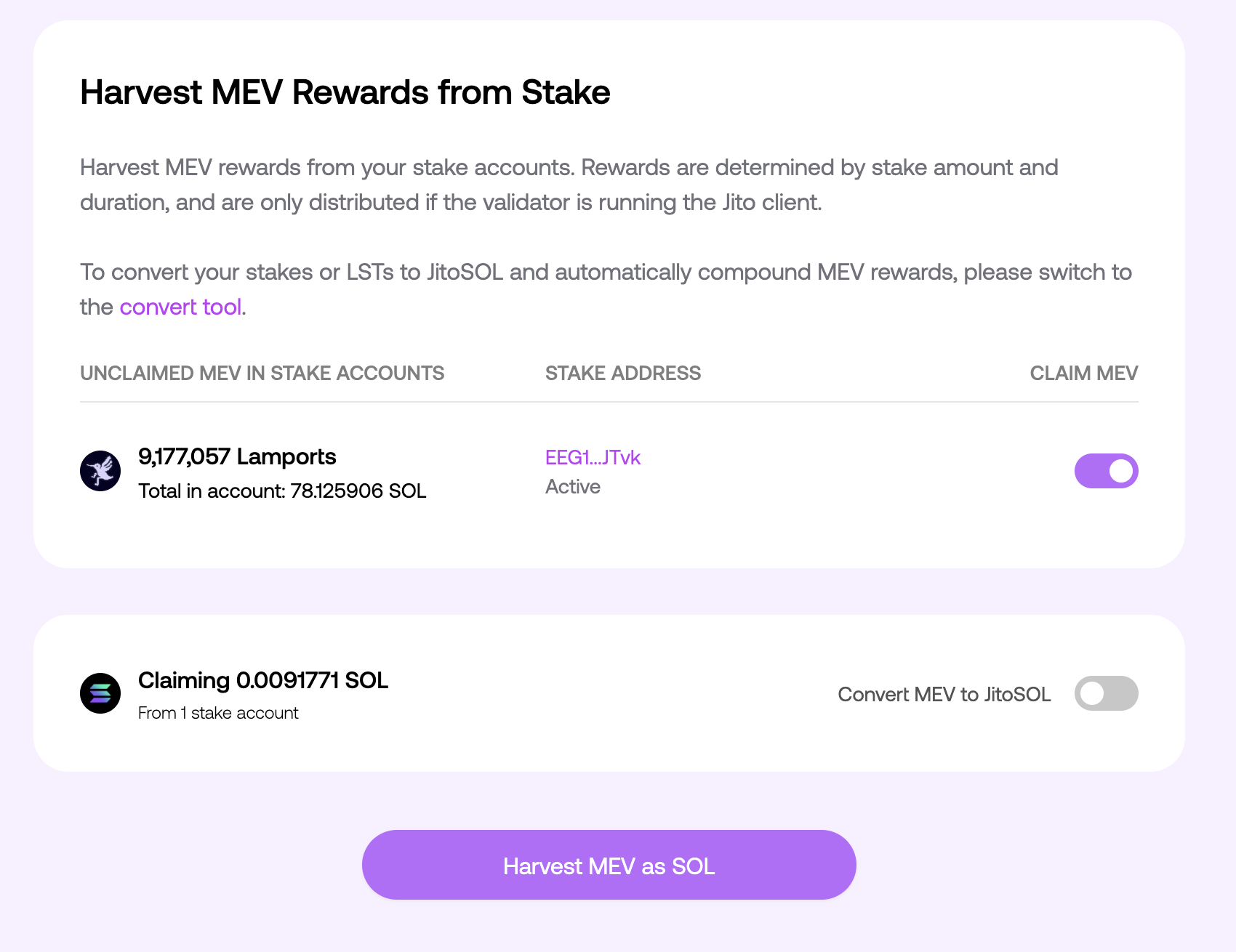
2. **Jito MEV rewards** – shown as inactive stake and available for **manual claiming and re-compounding**

🟢 **Kolibrio charges 0% commission** and shares **100% of both inflation and Jito MEV rewards** with stakers.

<br>

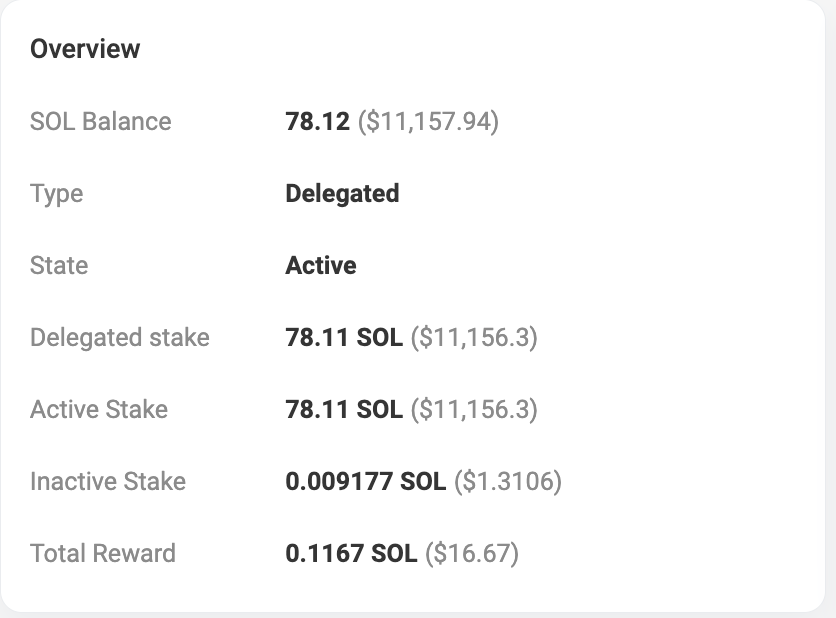
#### **How to View Rewards on Solscan**

Go to [Solscan](https://solscan.io/) and either:

* **Search for your stake account** directly (e.g., `9X9H...MowWn`),
* **Or search for your wallet address** and click the **"Stake Accounts"** tab to view all associated stake accounts.<br>

Once inside a stake account, review:

* 📈 **Total Reward** – Your **inflation rewards**, already included in your stake and **automatically re-compounded**
* 💤 **Inactive Stake** – Your **Jito MEV rewards**, ready to be claimed and re-staked if desired

<figure><img src="https://1868000901-files.gitbook.io/~/files/v0/b/gitbook-x-prod.appspot.com/o/spaces%2FhRgYcPxk1uWhwoszoApd%2Fuploads%2Fd50EN0bxtIZ69eknMk1U%2Fimage.png?alt=media&amp;token=c2c7b9da-298d-4ad5-b7d5-71df756011f4" alt=""><figcaption></figcaption></figure>

#### **Claim and Re-Compound Jito MEV Rewards**

To claim your **Jito MEV rewards** and optionally re-stake them:

1. Visit the Jito [Harvest UI](https://www.jito.network/harvest/)
2. Connect your wallet
3. Click **“Harvest”** if rewards are available
4. Claimed rewards will be sent to your wallet
5. To re-compound, manually stake the claimed SOL back to Kolibrio

<figure><img src="https://1868000901-files.gitbook.io/~/files/v0/b/gitbook-x-prod.appspot.com/o/spaces%2FhRgYcPxk1uWhwoszoApd%2Fuploads%2FZwPgiFeLGFko8yRdRZOe%2Fimage.png?alt=media&amp;token=adef98ac-0772-486c-bc76-1d90f4da9493" alt=""><figcaption></figcaption></figure>


# How to Make Your Kolibrio Stake Liquid

Kolibrio participates in the [**JPool liquid staking program**](https://app.jpool.one/validators/34mSDco9FM8599y4QF1GJvyWUrPixeT3zRNZAvzNXF6x), allowing you to stake SOL to Kolibrio and receive **JSOL**, a liquid representation of your stake. This lets you continue earning rewards while keeping your assets liquid for use across the Solana DeFi ecosystem.<br>

### **How to Stake to Kolibrio with JSOL**

1. Go to the [Kolibrio staking page on JPool](https://app.jpool.one/direct-staking?vote=34mSDco9FM8599y4QF1GJvyWUrPixeT3zRNZAvzNXF6x\&superminority=1\&private=1\&anonymous=1\&delinquent=1)
2. Select **Kolibrio** from the validator list
3. Enter the amount of SOL you want to stake\
   ![](https://1868000901-files.gitbook.io/~/files/v0/b/gitbook-x-prod.appspot.com/o/spaces%2FhRgYcPxk1uWhwoszoApd%2Fuploads%2FUFyLwp2j6oDjr1ROVNSX%2Fimage.png?alt=media\&token=eb0a3b20-4f0a-440b-9a9b-f8359188e8ec)
4. Click **Stake** and receive **JSOL** in return\
   \
   ![](https://1868000901-files.gitbook.io/~/files/v0/b/gitbook-x-prod.appspot.com/o/spaces%2FhRgYcPxk1uWhwoszoApd%2Fuploads%2FoFYdK2t2anqkLM5vrqWf%2Fimage.png?alt=media\&token=925ee6e9-4fd0-4b8d-a291-95b75d3e976c)![](https://1868000901-files.gitbook.io/~/files/v0/b/gitbook-x-prod.appspot.com/o/spaces%2FhRgYcPxk1uWhwoszoApd%2Fuploads%2FglxlgdOiOzw74L85rNvj%2Fimage.png?alt=media\&token=89fca557-8e5d-4e91-a198-cd39e97a41f5)

JSOL is fully backed by stake delegated to **Kolibrio** and can be used in swaps, lending, liquidity pools, and other DeFi apps.\ <br>

### **How Do I Get My Rewards?**

JSOL rewards are **automatically accrued**:

* You don’t need to claim them manually
* As the validator earns rewards, your share in the pool increases
* This is reflected in the **JSOL-to-SOL exchange rate**, which grows over time
* When you unstake or swap JSOL back to SOL, the current exchange rate determines the amount of SOL you receive

<br>

### **Benefits of Liquid Staking with Kolibrio**

* 💧 **Instant Liquidity** – Unstake anytime by swapping JSOL
* 🔁 **DeFi Ready** – Use JSOL in Solana DeFi protocols while still earning validator rewards
* 🔄 **Leverage Your Position** – For advanced users, JSOL can be used to **loop stake**:\
  → Lend JSOL to borrow more SOL\
  → Re-stake that SOL to receive more JSOL\
  → Repeat to create a **leveraged staking position**


# Searchers


# ETH Kolibrio OFA Searcher Connection

##

**Summary:** The interface is fully compatible with MEV Blocker. Connect to the WebSocket, include the `X-Bev-Signature` header, subscribe to partial pending transactions, and receive notifications via JSON‑RPC. Then, construct your backrun bundle and send it using `eth_sendBundle`.

### Endpoint

`wss://bev-relay.kolibr.io/eth`

**Required HTTP header** when establishing the WebSocket session:

`X-Bev-Signature: <signature>`

> The X-Bev-Signature header is used for authentication/authorization. The signature format and keys are provided by the Kolibrio team.

***

### Subscription

After a successful connection, send the following JSON‑RPC request to subscribe:

```jsx
{"method": "eth_subscribe","params": ["mevblocker_partialPendingTransactions"]}
```

**Expected response:**

```jsx
{"jsonrpc": "2.0", "id": 1, "result": "0xd58bbbc0f5190962eff01b6f0ec17724"}
```

After this, you’ll start receiving `eth_subscription` notifications when new relevant transactions appear.

***

### Incoming Signal Format

Example notification:

```jsx
{
		"jsonrpc": "2.0",
		"method": "eth_subscription",
		"params": {
		"subscription": "0xd58bbbc0f5190962eff01b6f0ec17724",
				"result": {
						"chainId": "0x1",
						"to": "0x..",
						"value": "0x4fefa17b724000",
						"data": "0x",
						"accessList": [],
						"nonce": "0x10",
						"maxPriorityFeePerGas": "0x0",
						"maxFeePerGas": "0x7e1c65b04",
						"gas": "0x5208",
						"type": "0x2",
						"hash": "0xd...4c",
						"from": "0x.."
				}
		}
}
```

**Note:** All numeric fields are hex‑encoded.

***

### Sending a Bundle

Once you’ve built your signed backrun transaction, send it as a bundle via the same WebSocket or simple HTTP POST request:

```jsx
{
  "jsonrpc": "2.0",
  "id": 1,
  "method": "eth_sendBundle",
  "params": [
    {
      "txs": [
        "0x02abcd...", // target transaction hash (32 bytes)
        "0x02abcd..." // your signed bacrkun raw transaction
        ...
      ],
      "blockNumber": "0xb63dcd",
      "minTimestamp": 0,
      "maxTimestamp": 1615920932
    }
  ]
}
```

***

### Best Practices & Constraints

* Treat the target transaction `hash` as a 32‑byte hex string (with `0x` prefix).
* Both transaction hashes and raw signed transactions are accepted in `txs`.
* The order of `txs` matters: target transaction first, followed by your backrun txs.

***

### Example Flow

1. Open WS connection → `wss://bev-relay.kolibr.io/eth` with `X-Bev-Signature`.
2. Send `eth_subscribe` to `mevblocker_partialPendingTransactions`.
3. Receive `eth_subscription` messages with `result` → process and build your backrun transaction.
4. Send `eth_sendBundle` containing the target hash and your signed transaction(s).

***

### Security Notes

* Keep your signing keys and `X-Bev-Signature` secrets secure.


# Base Kolibrio OFA Searcher Connection

##

**Summary:** The interface is fully compatible with MEV Blocker. Connect to the WebSocket, include the `X-Bev-Signature` header, subscribe to partial pending transactions, and receive notifications via JSON-RPC. Construct your backrun bundle from the incoming signals and submit it using `eth_sendBundle`.

### Important behavioral difference vs ETH stream

BASE’s stream not only hides the transaction signature, it also *masks the gas fields in the transaction payload* (fakes gas-related values). When a searcher wins a bid, they will receive the same transaction notification again — but with the **real** gas values.

This means you must treat duplicate notifications for the same transaction hash as *authoritative updates*, and you must update/correct your gas-price estimates for any pending bids based on the later message that contains the real gas info. Failing to do so will cause your bundle bids to be priced incorrectly.

**BASE Auction Time:** 250ms

### Endpoint

`wss://bev-relay.kolibr.io/base`

**Required HTTP header** when establishing the WebSocket session:

`X-Bev-Signature: <signature>`

> The X-Bev-Signature header is used for authentication/authorization. The signature format and keys are provided by the Kolibrio team.

***

### Subscription

After a successful connection, send the following JSON‑RPC request to subscribe:

```jsx
{"method": "eth_subscribe","params": ["mevblocker_partialPendingTransactions"]}
```

**Expected response:**

```jsx
{"jsonrpc": "2.0", "id": 1, "result": "0xd58bbbc0f5190962eff01b6f0ec17724"}
```

After this, you’ll start receiving `eth_subscription` notifications when new relevant transactions appear.

***

### Incoming Signal Format

Example notification:

```jsx
{
  "jsonrpc": "2.0",
  "method": "eth_subscription",
  "params": {
    "subscription": "0x6e...",
    "result": {
      "hash": "0xb3406...",
      "chainId": "0x2105",
      "type": "0x2",
      "from": "0x192...",
      "to": "0x4...
      "value": "0x5af3107a4000",
      "data": "0xffff",
      "nonce": "0x0",
      "gas": "0x5208",
      "maxPriorityFeePerGas": "0xf4240",
      "maxFeePerGas": "0x26643aa",
      "accessList": []
    },
    "revshareAddress": "0x90000...."
  }
}
```

**Note:** The bacrkun bid should be sent to in WETH or ETH to revshareAddress\
**Note:** All numeric fields are hex‑encoded.

***

## 🧩 Two-Phase Gas Revelation

Kolibrio implements a **two-phase gas revelation** mechanism to ensure fair bidding behavior across searchers.

When a transaction first appears in the Kolibrio stream, its gas parameters are intentionally **masked**.\
Only after a valid bid is submitted - the **real gas values** be revealed.

This process happens in two distinct phases:

### Phase 1 — Initial Signal *(Fake Gas)*

You’ll receive an early notification containing **placeholder (fake)** gas values.

**Example:**

```json
{
  "hash": "0xabc...",
  "maxFeePerGas": "0x5f5e100",  // FAKE (e.g. 100 gwei)
  "maxPriorityFeePerGas": "0x3b9aca00",
  "revshareAddress": "0x90000...."
}
```

At this stage:

* Treat the message as a *signal*.
* Submit your **initial bundle** using the placeholder gas with WETH  or ETH transfer to *revshareAddress* from signal
* Record the transaction hash for later update.

### Phase 2 — Real Gas *(After Valid Bid)*

If your initial bid is **valid and wins the action**, Kolibrio will resend the **same transaction hash**.\
This time, the payload will include the **real gas parameters**.

**Example:**

```json
{
  "hash": "0xabc...",
  "maxFeePerGas": "0x26643aa",  // REAL (e.g. 40 gwei)
  "maxPriorityFeePerGas": "0x1dcd6500", 
  "revshareAddress": "0x90000...."
}
```

At this stage:

* Replace the placeholder gas data with the real one.
* Resubmit a **final bundle** with correctly priced gas.

***

### Sending a Bundle

Once you’ve built your signed backrun transaction, send it as a bundle via the same WebSocket or simple HTTP POST request:

```jsx
{
  "jsonrpc": "2.0",
  "id": 1,
  "method": "eth_sendBundle",
  "params": [
    {
      "txs": [
        "0x02abcd...", // target transaction hash (32 bytes)
        "0x02abcd..." // your signed bacrkun raw transaction
        ...
      ]
    }
  ]
}
```

***

### Best Practices & Constraints

* Send your bid/payment to the provided revshareAddress
* Treat the target transaction `hash` as a 32‑byte hex string (with `0x` prefix).
* Both transaction hashes and raw signed transactions are accepted in `txs`.
* The order of `txs` matters: target transaction first, followed by your backrun txs.

***

### Example Flow

1. Open WS connection → `wss://bev-relay.kolibr.io/base` with `X-Bev-Signature`.
2. Send `eth_subscribe` to `mevblocker_partialPendingTransactions`.
3. Receive `eth_subscription` messages with `result` with fake gas
4. Process and build your backrun transaction with WETH  or ETH transfer to `revshareAddress`. Send `eth_sendBundle` containing the target hash and your signed transaction.
5. In 0-250ms - Receive `eth_subscription` messages with `result` with real gas
6. Process and build your backrun transaction with WETH  or ETH transfer to `revshareAddress`. Send `eth_sendBundle` containing the target hash and your signed transaction.

***

### Security Notes

* Keep your signing keys and `X-Bev-Signature` secrets secure.


# BNB Kolibrio OFA Searcher Connection

##

**Summary:** The interface is fully compatible with MEV Blocker. Connect to the WebSocket, include the `X-Bev-Signature` header, subscribe to partial pending transactions, and receive notifications via JSON-RPC. Construct your backrun bundle from the incoming signals and submit it using `eth_sendBundle`.

### Endpoint

`wss://bev-relay.kolibr.io/bsc`\
`https://bev-relay.kolibr.io/bsc`

**Required HTTP header** when establishing the WebSocket session:

`X-Bev-Signature: <signature>`

> The X-Bev-Signature header is used for authentication/authorization. The signature format and keys are provided by the Kolibrio team.

***

### Subscription

After a successful connection, send the following JSON‑RPC request to subscribe:

```jsx
{"method": "eth_subscribe","params": ["mevblocker_partialPendingTransactions"]}
```

**Expected response:**

```jsx
{"jsonrpc": "2.0", "id": 1, "result": "0xd58bbbc0f5190962eff01b6f0ec17724"}
```

After this, you’ll start receiving `eth_subscription` notifications when new relevant transactions appear.

***

### Incoming Signal Format

Example notification:

```jsx
{
  "jsonrpc": "2.0",
  "method": "eth_subscription",
  "params": {
    "subscription": "0x6e...",
    "result": {
      "hash": "0xb3406...",
      "chainId": "0x2105",
      "type": "0x2",
      "from": "0x192...",
      "to": "0x4...
      "value": "0x5af3107a4000",
      "data": "0xffff",
      "nonce": "0x0",
      "gas": "0x5208",
      "maxPriorityFeePerGas": "0xf4240",
      "maxFeePerGas": "0x26643aa",
      "accessList": []
    },
    "revshareAddress": "0x90000...."
  }
}
```

**Note:** The bacrkun bid should be sent to in WBNB or BNB to revshareAddress\
**Note:** All numeric fields are hex‑encoded.

***

### Sending a Bundle

Once you’ve built your signed backrun transaction, send it as a bundle via the same WebSocket or simple HTTP POST request:

```json
{
  "jsonrpc": "2.0",
  "id": 1,
  "method": "eth_sendBundle",
  "params": [
    {
      "txs": [
        "0x02abcd...", // target transaction hash (32 bytes)
        "0x02abcd..." // your signed bacrkun raw transaction
        ...
      ]
    }
  ]
}
```

***

### Best Practices & Constraints

* Send your bid/payment to the provided revshareAddress
* Treat the target transaction `hash` as a 32‑byte hex string (with `0x` prefix).
* Both transaction hashes and raw signed transactions are accepted in `txs`.
* The order of `txs` matters: target transaction first, followed by your backrun txs.

***

### Example Flow

1. Open WS connection → `wss://bev-relay.kolibr.io/bsc` with `X-Bev-Signature`.
2. Send `eth_subscribe` to `mevblocker_partialPendingTransactions`.
3. Receive `eth_subscription` messages with `result` with `revshareAddress`
4. Process and build your backrun transaction with WBNB  or BNB transfer to `revshareAddress`.&#x20;
5. Send `eth_sendBundle` containing the target hash and your signed transaction. using same ws endpoint (`wss://bev-relay.kolibr.io/bsc`) or the https one (`https://bev-relay.kolibr.io/bsc)`

***

### Security Notes

* Keep your signing keys and `X-Bev-Signature` secrets secure.


# ARBITRUM Kolibrio OFA Searcher Connection

##

**Summary:** The interface is fully compatible with MEV Blocker. Connect to the WebSocket, include the `X-Bev-Signature` header, subscribe to partial pending transactions, and receive notifications via JSON-RPC. Construct your backrun bundle from the incoming signals and submit it using `eth_sendBundle`.

### Endpoint

`wss://bev-relay.kolibr.io/arb`\
`https://bev-relay.kolibr.io/arb`

**Required HTTP header** when establishing the WebSocket session:

`X-Bev-Signature: <signature>`

> The X-Bev-Signature header is used for authentication/authorization. The signature format and keys are provided by the Kolibrio team.

***

### Subscription

After a successful connection, send the following JSON‑RPC request to subscribe:

```jsx
{"method": "eth_subscribe","params": ["mevblocker_partialPendingTransactions"]}
```

**Expected response:**

```jsx
{"jsonrpc": "2.0", "id": 1, "result": "0xd58bbbc0f5190962eff01b6f0ec17724"}
```

After this, you’ll start receiving `eth_subscription` notifications when new relevant transactions appear.

***

### Incoming Signal Format

Example notification:

```jsx
{
  "jsonrpc": "2.0",
  "method": "eth_subscription",
  "params": {
    "subscription": "0x6e...",
    "result": {
      "hash": "0xb3406...",
      "chainId": "0x2105",
      "type": "0x2",
      "from": "0x192...",
      "to": "0x4...
      "value": "0x5af3107a4000",
      "data": "0xffff",
      "nonce": "0x0",
      "gas": "0x5208",
      "maxPriorityFeePerGas": "0xf4240",
      "maxFeePerGas": "0x26643aa",
      "accessList": []
    },
    "revshareAddress": "0x90000...."
  }
}
```

**Note:** The bacrkun bid should be sent to in WETH or ETH to revshareAddress\
**Note:** All numeric fields are hex‑encoded.

***

### Sending a Bundle

Once you’ve built your signed backrun transaction, send it as a bundle via the same WebSocket or simple HTTP POST request:

```json
{
  "jsonrpc": "2.0",
  "id": 1,
  "method": "eth_sendBundle",
  "params": [
    {
      "txs": [
        "0x02abcd...", // target transaction hash (32 bytes)
        "0x02abcd..." // your signed bacrkun raw transaction
        ...
      ]
    }
  ]
}
```

***

### Best Practices & Constraints

* Send your bid/payment to the provided revshareAddress
* Treat the target transaction `hash` as a 32‑byte hex string (with `0x` prefix).
* Both transaction hashes and raw signed transactions are accepted in `txs`.
* The order of `txs` matters: target transaction first, followed by your backrun txs.

***

### Example Flow

1. Open WS connection → `wss://bev-relay.kolibr.io/arb` with `X-Bev-Signature`.
2. Send `eth_subscribe` to `mevblocker_partialPendingTransactions`.
3. Receive `eth_subscription` messages with `result` with `revshareAddress`
4. Process and build your backrun transaction with WBNB  or BNB transfer to `revshareAddress`.&#x20;
5. Send `eth_sendBundle` containing the target hash and your signed transaction. using same ws endpoint (`wss://bev-relay.kolibr.io/arb`) or the https one (`https://bev-relay.kolibr.io/arb)`

***

### Security Notes

* Keep your signing keys and `X-Bev-Signature` secrets secure.


# Solana Kolibrio OFA Searcher Connection

**GRPC Latest protofile:**

{% file src="/files/VGi8Ejf8OAmOia89qZpp" %}

**Current gRPC connection URL:** <https://searcher.kolibr.io> (requires *authorization* header in metadata)

**Current WS connection URL:**  wss\://solana.kolibr.io/ws (requires *x-api-key* header)

For the connection, a searcher requires an ApiKey that can be retrieved from the Kolibrio team<br>

***

**Glossary:**\
**OFA** - *order flow auction*\
**Originator** - *entity that produces a transaction*\
**Signal** - *originator’s transaction with metadata*\
**Jito** - <https://www.jito.wtf/>\
**Jito Backrun** *- transaction bundle that consists of 1 to 3 transactions and follows the following rules:*

* *Transaction order is guaranteed*
* *Every transaction in a bundle simulates on top of the previous one*
* *If one of the transactions reverts, the whole bundle will not be mined*

**Priority Backrun** - a set of transactions with a [priority fee](https://solana.com/developers/guides/advanced/how-to-use-priority-fees). Order is not guaranteed, but most likely they will be sorted by Fee. No revert protection. Faster inclusion

***

**Workflow:**\
After the connection establishment and stream subscription, searchers will start to receive signals\
Each signal consists of the following fields:

```
{
"id": string,
"revshare_address": string,
"message": []byte,
"priority_revshare_address": string,
}
```

| **id**                          | unique identification of the target transaction. The searcher should pass it back to bind backrun transactions to the target transaction.       |
| ------------------------------- | ----------------------------------------------------------------------------------------------------------------------------------------------- |
| **message**                     | bytes array that represents [Solana Transaction Message](https://github.com/anza-xyz/agave/blob/v2.1.13/sdk/program/src/message/legacy.rs#L131) |
| **revshare\_address**           | solana address where searcher should do transfer as bribe in jito backrun transaction                                                           |
| **priority\_revshare\_address** | solana address where searcher should do transfer as bribe in priority backrun transaction                                                       |

To submit a result, a searcher needs to send a message in a following format:

```
{
      "id": string,
      "jito_backrun": [][]byte,
      "priority_backrun": [][]byte,
      "expected_bid_lamports": int64,
}
```

| **id**                | unique identification of the target transaction. Refer to the id from the signal.                                                                                                                                                                                                    |
| --------------------- | ------------------------------------------------------------------------------------------------------------------------------------------------------------------------------------------------------------------------------------------------------------------------------------ |
| **jito\_backrun**     | <p>array of fully signed backrun transactions in bytes for Jito bundle and transfer to <strong>revshare\_address</strong><br><br><em>this transactios will be sent in jito bundle with target signal</em></p>                                                                        |
| **priority\_backrun** | <p>array of fully signed backrun transactions in bytes for sending with the fastest inclusion and transfer to <strong>priority\_revshare\_address</strong><br><br><em>this transactios will be sent in via fastest swqos & paladin connection.</em><br><em>learn more below</em></p> |

**⚠️NOTE: For a bid to be valid, the searcher transaction MUST include a separate transfer instruction to the revshare\_address or priority\_revshare\_address.**<br>

***

WS example:

```
  const conn = new WebSocket("wss://solana.kolibr.io/ws", {
    headers: {
      'Content-Type': 'application/json',
      'X-Api-Key': apiKey, //ApiKey
    },
    perMessageDeflate: true,
  });

  conn.on('open', async (ws) => {
    console.log('connected')
  });

  conn.on('message', async (wsMsg) => {
    const signal = JSON.parse(wsMsg);
    const jitoBackrun = doSearcherMagic(signal);
    const priorityBackrun = doSearcherMagic(signal);
    const expectedBidLamports = doSearcherMagic(signal);
    
    const result = {
      id: opportunitySignal.id,
      jito_backrun: [[...jitoBackrun]],
      priority_backrun: [[...priorityBackrun]],
      expected_bid_lamports: expectedBidLamports
    }

    conn.send(JSON.stringify(result));
  })

  conn.on('ping', () => {
    conn.pong()
  })
```

GRPC example:

{% file src="/files/CPguLE08hOYvWFp70bPK" %}

***

**⚡ Priority Backruns**

Due to Solana’s high-throughput architecture and the varying broadcast requirements of different originators, there are edge cases where the **Kolibrio target signal** reaches the block leader *before* the full atomic Kolibrio bundle (i.e., the original transaction + arbitrage).

If this happens, and the signal gets included in a block *without* the associated arbitrage backrun, the arbitrage opportunity remains live on-chain. In such cases, the first random searcher to detect the transaction in the shred stream can still capture the value.

To handle these edge cases, Kolibrio introduces fallback auctions via Priority Backruns — a fast, parallel execution path for high-value recovery, which gives a clear **advantage to Kolibrio participants over regular shred-stream searchers**.

**🛠 How it Works**

* **Optional fallback**: In addition to the standard `jito_backrun`, searchers can include a `priority_backrun` — a high-speed backup arbitrage path.
* **Requirements** for a *priority\_backrun*:
  * Should include a **priority fee**.
  * Must send a tip to a **priority\_revshare\_address** defined by the originator.
* **Execution mechanics**:
  * Priority backruns are **broadcast via SWQoS and Paladin** low-latency channels with **\~2 ms artificial delays between each**, based on **Kolibrio Tip** — higher tips are sent earlier (resulting in \~5–10 index positions between broadcasts).
  * **Kolibrio will only broadcast priority\_backruns if**:
    * The target signal was created by a high-quality originator (e.g., trusted dApp, not a spam bot).
    * There is a credible probability that the signal will land *non-atomically* (i.e., without its associated arbitrage bundle).
* **Risk/Reward trade-off**:
  * priority\_backrun transactions may revert if the arbitrage is already handled in the original atomic bundle.
  * However, they give searchers a **chance to catch leftover MEV** faster than public shred-stream observers.

**📦 How to Land a Priority Backrun**

To land a priority backrun, your goal is to get as close as possible to the original signal in block position.

You need to balance:

* 🧾 **Priority Fee** — affects your on-chain placement.
* 💸 **Kolibrio Tip** — determines the **broadcast order** via SWQoS.

Kolibrio broadcasts selected backruns using **SWQoS + Paladin**, with \~2 ms artificial delays (resulting in \~5–10 index positions between each).

> ⚠️ A low priority fee can place you too far below the target, even if your Kolibrio Tip is high. Your goal is to land close — tune precisely for maximum impact.

***

**Multiregion:**

Kolibrio's main engine is located in Amsterdam, but there are also endpoints in other regions.

If a user transaction is created outside the EU, it will still be forwarded to the main server in Amsterdam — and if you're connected only to it, you'll receive it. However, a small percentage of transactions might appear slightly faster on another regional endpoint.

**Recommendation:** Use the Amsterdam main server for both listening to the stream and submitting transactions, but also monitor other regional endpoints to gain a small timing advantage.

| **Region**     | **GRPC URL**                       | **WS URL**                       |
| -------------- | ---------------------------------- | -------------------------------- |
| Amsterdam Main | <https://searcher.kolibr.io>       | wss\://solana.kolibr.io/ws       |
| Tokyo          | <https://tokyo-searcher.kolibr.io> | wss\://tokyo-solana.kolibr.io/ws |
| Salt Lake City | <https://slc-searcher.kolibr.io>   | wss\://slc-solana.kolibr.io/ws   |
| New York       | <https://ny-searcher.kolibr.io/>   | wss\://ny-solana.kolibr.io/ws    |
| Frankfurt      | <https://fra-searcher.kolibr.io/>  | wss\://fra-solana.kolibr.io/ws   |

***

### ⚠️ Main Rule: **NO FORM OF FRONTRUNNING IS ALLOWED.**

*Kolibrio system continuously monitors searchers behavior and runs analytics on top of target signal transactions. if any malicious behavior such as non atomic frontruns will be discovered - searcher will receive forever ban.*


# Validator Connection


# Relayer (Mempool Monetization)

**Relayer** is a component that allows your validator to stream incoming **TPU transactions** (pending mempool) to trusted Kolibrio searchers — before they land in a block. Searchers use this flow to find arbitrage opportunities and share a portion of the MEV revenue back with validator.

**What is TPU?** TPU (Transaction Processing Unit) is the entry point on a Solana validator where transactions are received directly from users and forwarded for processing. Since these transactions haven't been sequenced yet, searchers get a first look at pending orderflow — the earliest possible signal for finding and executing profitable opportunities.

Unlike shreds (which carry already-processed data), the relayer gives searchers access to transactions **earlier in the pipeline** — making the flow more valuable and therefore generating higher tips for the validator.<br>

**Repository:** [jito-relayer](https://github.com/jito-foundation/jito-relayer)

Guide: <https://jito-foundation.gitbook.io/mev/jito-relayer/running-a-relayer>

#### Additional Configuration:

1. Set Kolibrio Block Engine endpoints:

   ```bash
   RUST_LOG=warn
   BLOCK_ENGINE_AUTH_SERVICE_URL=https://auth-be.kolibr.io
   BLOCK_ENGINE_URL=https://srvr-be.kolibr.io
   RPC_SERVERS=...
   WEBSOCKET_SERVERS=...
   KEYPAIR_PATH=/opt/jito-relayer/relayer-keypair.json
   SIGNING_KEY_PEM_PATH=/opt/jito-relayer/private.pem
   VERIFYING_KEY_PEM_PATH=/opt/jito-relayer/public.pem
   FORWARD_ALL=true
   PACKET_DELAY_MS=200
   ```

\
**Regions** \
select the closest one to your relayer machine&#x20;

| Region                                                                                                                                                                                                                         | Urls                                                                                                                                       |
| ------------------------------------------------------------------------------------------------------------------------------------------------------------------------------------------------------------------------------ | ------------------------------------------------------------------------------------------------------------------------------------------ |
| Amsterdam Main                                                                                                                                                                                                                 | <p><https://srvr-be.kolibr.io></p><p><a href="https://auth-be.kolibr.io/"><https://auth-be.kolibr.io/></a></p>                             |
| Tokyo                                                                                                                                                                                                                          | <p>\<a href="<https://tokyo-auth-be.kolibr.io>                                                                                             |
| [https://tokyo-srvr-be.kolibr.io">https://tokyo-auth-be.kolibr.io](https://docs.kolibrio.xyz/validator-connection/https:/tokyo-srvr-be.kolibr.io">https:/tokyo-auth-be.kolibr.io)<br><https://tokyo-srvr-be.kolibr.io></a></p> |                                                                                                                                            |
| Salt Lake City                                                                                                                                                                                                                 | <p>\<a href="<https://slc-auth-be.kolibr.io>                                                                                               |
| [https://slc-srvr-be.kolibr.io">https://slc-auth-be.kolibr.io](https://docs.kolibrio.xyz/validator-connection/https:/slc-srvr-be.kolibr.io">https:/slc-auth-be.kolibr.io)<br><https://slc-srvr-be.kolibr.io></a></p>           |                                                                                                                                            |
| New York                                                                                                                                                                                                                       | <p><a href="https://ny-auth-be.kolibr.iohttps//ny-srvr-be.kolibr.io"><https://ny-auth-be.kolibr.io><br>https//ny-srvr-be.kolibr.io</a></p> |
| Frankfurt                                                                                                                                                                                                                      | <p><https://fra-auth-be.kolibr.io></p><p><https://fra-srvr-be.kolibr.io></p>                                                               |

#### **🛡 Firewall Settings.**

Open the following tcp ports:

* `11228`, `11229` for traffic
* `11226` if the relayer is **not on the same server** as the validator

#### 🔔 Please inform us of:

1. **Solana public key** of the relayer and the **validator identity** — so Kolibrio can whitelist them.
2. The **revshare address** for validator arbitrage revenue.


# BE Adapter (Blockspace Monetization)

**Repository:** [kolibrio-milti-be-adapter](https://github.com/kolibriomev/kolibrio-milti-be-adapter)

The adapter must be deployed on the **same server as the validator**. You can download the binary from the [Releases](https://github.com/kolibriomev/kolibrio-milti-be-adapter/releases) section.

#### Setup Steps:

1. **Generate RSA key pair** (private/public) and store them securely:

   ```bash
   openssl genpkey -algorithm RSA -out /etc/adapter/keys/private.pem -pkeyopt rsa_keygen_bits:2048
   openssl rsa -pubout -in /etc/adapter/keys/private.pem -out /etc/adapter/keys/public.pem
   ```
2. **Run the adapter with the following parameters:**

   ```bash
   ./kolibrio-milti-be-adapter-x86_64-linux-gnu \\
     --block-engine-url <nearest_Jito_block_engine_URL> \\
     --allowed-searchers "GPXBbymhimC4rZU1n2L7s3qGzMrN2ZHkY2mJiaydNTvq" \\
     --signing-key-pem-path "/etc/adapter/keys/private.pem" \\
     --verifying-key-pem-path "/etc/adapter/keys/public.pem"
   ```
3. **Ensure automatic restarts** on failure (e.g., using `systemd`, `supervisord`).

#### **🛡 Firewall Settings.**

Open the following tcp ports:

* `searchers-grpc-port` (default: `11301`)

#### ⚙️ Validator Configuration:

Replace the `block-engine-url` with the adapter address:

```bash
<http://0.0.0.0:11300>
```